What does each Snowflake app cost? Seeing it app by app
Snowflake now makes it easy to build apps next to the data: Streamlit in Snowflake for Python apps, App Runtime for full web apps. Once a company has a few dozen of them, one question comes up from whoever looks after the Snowflake bill: what does each of these apps cost, and who still uses it?
Snowflake records everything needed to answer it. It is just not one number per app. Here is how an app’s cost adds up, where Snowflake shows it, and how to see it app by app.
How an app’s cost adds up
An app on Snowflake pays for two things: the compute that runs the app, and the compute that runs its queries.
Streamlit on a warehouse. The app’s Python and its queries run on a virtual warehouse. A warehouse bills per second while it runs, with a minimum of 60 seconds each time it starts, and keeps running after the last query until its auto-suspend time has passed. An app that a few people open throughout the day can keep its warehouse awake for much of it.
Streamlit on the container runtime, and App Runtime apps. These run on a compute pool, billed while its nodes run. Snowflake’s product manager for App Runtime explained on Reddit that apps share a pool Snowflake manages, billed per node-hour, and that “apps run until you stop them”. The queries such an app sends run on a warehouse, like any other workload.
So an app’s cost depends less on how big it is than on how often it is opened and how long its compute stays up afterwards.
Where Snowflake shows it
- Account usage views.
WAREHOUSE_METERING_HISTORYandMETERING_HISTORYin theSNOWFLAKE.ACCOUNT_USAGEschema record credits by warehouse and by service, hour by hour, and query history shows who ran what. - Cost Management in Snowsight, for the totals by warehouse and by service.
- Budgets and resource monitors, for limits and alerts on spend.
What these do not give is a list of apps with a cost next to each one. A warehouse shared by ten apps shows one figure, and, in the words of the same product manager, for App Runtime “you see usage per account, not per app”.
Four habits that make app costs visible
These work with Snowflake on its own:
- Give apps their own warehouse, or one per team, so a warehouse’s credits mean something.
- Set auto-suspend to match how the app is used. A dashboard opened twice a day does not need its warehouse awake between visits.
- Use Snowflake Budgets so the people responsible hear about spend before the month ends, not after.
- Look at apps nobody opens. An app with no viewers for 60 days is a question for its owner.
Seeing it app by app with StreamGen
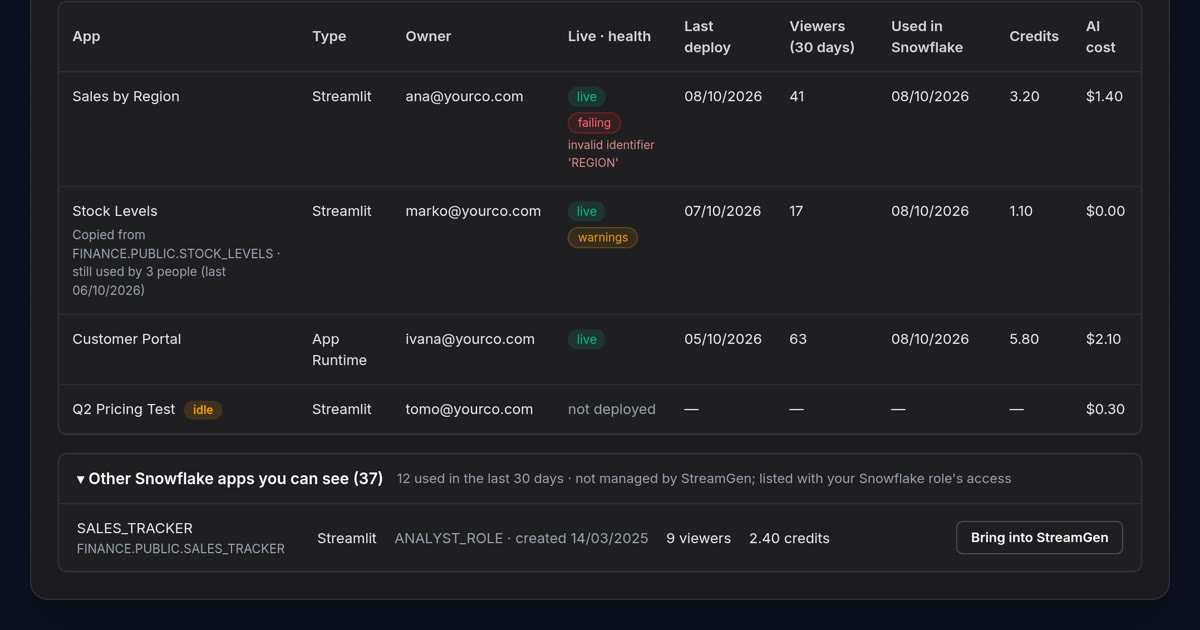
StreamGen reads the same account usage views and puts the answer in one list: every Streamlit and App Runtime app your Snowflake role can see, built in StreamGen or not, with its owner, its viewers over the last 30 days, its last use, and what it costs in credits and money. Apps nobody has opened for 60 days are flagged. One honest limit: App Runtime apps that StreamGen did not deploy are listed without usage figures, because Snowflake does not record those per app.
That inventory is in StreamGen today, hosted on Uppcoder. The Snowflake Native App, now awaiting approval on the Snowflake Marketplace, adds control for the apps StreamGen runs: apps off at a set time, such as 20:00 on workdays, or after a few hours without viewers, starting again on their own when someone opens them, and a monthly budget with an email to admins at 80% and 100%.
The point is not to spend less on Snowflake. It is to know what each app costs and who it serves, so that building more apps is an easy decision.
Try it
See the inventory on a sample retail company’s data: try StreamGen free for two hours, no sign-up and no Snowflake account needed.
StreamGen is a product of Websson d.o.o., Pula, the makers of Uppcoder.