StreamGen: every Snowflake app in your company, in one place
Building one app on Snowflake is easy now. Streamlit runs inside the account, App Runtime runs full web apps next to the data, and Cortex writes code. The hard part starts when more than a few people build apps: which apps exist, who owns them, who still opens them, what each one costs, and which one breaks when a column is renamed.
StreamGen is built for the team that has to answer those questions. It is the app factory for Snowflake: one place to see every app in the account, keep them working, and let analysts build new ones by describing them, under one set of rules.
See every app, built in StreamGen or not
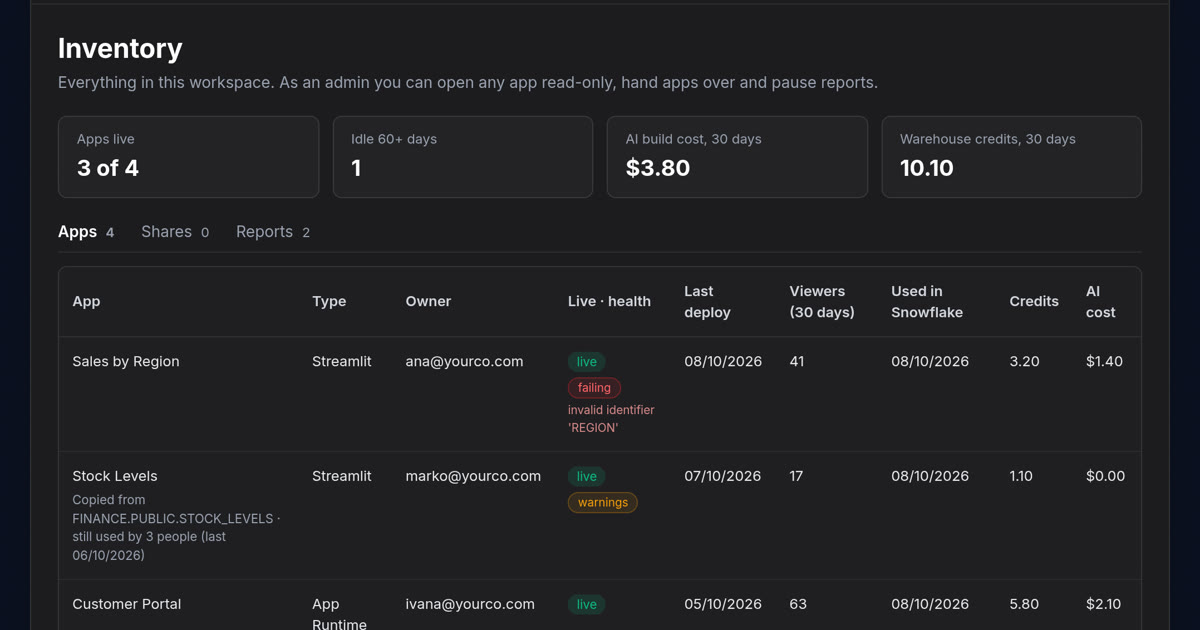
StreamGen’s inventory lists every Streamlit and App Runtime app your Snowflake role can see, including the ones people built by hand in Snowsight long before StreamGen arrived. For each app:
- the owner, whether it is live, the last deploy and the last use
- a health badge: healthy, warnings or failing
- who opened it over the last 30 days, by name
- what it costs, in credits and money
- for apps StreamGen built, what the AI cost to build it
Apps nobody has opened for 60 days are flagged, with what it takes to retire each one, and an app can be handed to a new owner when someone leaves. The usage comes from your account’s own records, Snowflake’s account usage views, read through your Snowflake connection.
Keep them working
Every night StreamGen checks each app against your data, so a dropped column or a lost grant shows up before a user finds it. Security advisories flag risky packages, and fixes are made in a separate environment and reviewed before they go live.
Let people who don’t code build apps
An analyst describes the app in plain English and watches it run on real data while StreamGen’s agent writes, tests and deploys it. No command line, no editor and no Git for the person asking. StreamGen builds both kinds of Snowflake app:
- Streamlit apps, on either Streamlit runtime (warehouse or container)
- web apps on Snowflake App Runtime, for when a dashboard is not enough
The agent works with the Cortex models your account offers, and an allowlist decides which AI models any workspace may use.
Many builders, one set of rules
Roles, groups and policies; sharing with permissions; deploy approvals with a review before production; version history and an audit log. The apps themselves are ordinary Snowflake apps, so they keep running without StreamGen.
Apps you already have can come along: Bring into StreamGen copies a Streamlit app next to the original, the original keeps running while people move over, and StreamGen shows when nobody uses the old one any more. It never drops anything itself.
Where it runs
Hosted on Uppcoder, available now. Nothing to install: StreamGen is deployed from Uppcoder’s catalogue and running in minutes, on its own address or your own domain, with its database and backups looked after. It connects to your Snowflake account, and the apps it builds run there.
As a Snowflake Native App, coming soon. We have submitted StreamGen to the Snowflake Marketplace and it is awaiting Snowflake’s approval. Installed inside your own account, your people sign in with their Snowflake login, StreamGen acts as each signed-in user and never more, and your data never leaves the account. The Native App also adds cost control for the apps it runs: apps off at a set time or after a few hours without viewers, and a monthly budget with an email before it is spent.
On your own network, available soon. One container and a PostgreSQL database inside your perimeter.
Pricing
One flat licence price, wherever StreamGen runs: from €49 a month, not per seat. Extra viewers cost nothing.
Try it
Try StreamGen free for two hours: no sign-up, no credit card and no Snowflake account needed, on a sample retail company’s data. Launch the free sandbox, or read more at streamgen.io.
StreamGen is a product of Websson d.o.o., Pula, the makers of Uppcoder.